> For the complete documentation index, see [llms.txt](https://docs.efento.io/llms.txt). Markdown versions of documentation pages are available by appending `.md` to page URLs; this page is available as [Markdown](https://docs.efento.io/efento-cloud/integrations/alert-webhooks.md).
# Alert webhooks
Efento Cloud allows you to use alert webhooks as a notification method for your rules.
### Before You Start
To configure and use **Efento Cloud webhooks**, you’ll need the following:
* **An application** capable of receiving incoming webhooks, parsing their content, and responding with a `201` status code to each received message.
* **An Efento Cloud account** with *Administrator* permissions for the selected organisation.
### Create a new webhook integrations
{% stepper %}
{% step %}
#### **1. Create a New Webhook**
1. In the left-hand menu, go to **Settings** (gear icon) → **Organization settings**.
2. Navigate to the **Integrations** tab.
3. In the **Webhook** section, click **Add Webhook**.
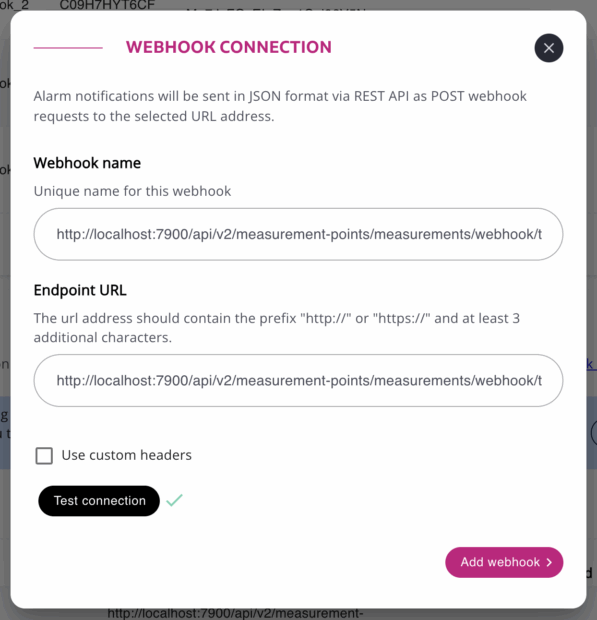
4. Enter the **Webhook name** and **URL**.
* *(Optional)* To use **custom headers** for webhooks sent by Efento Cloud, check **Use custom headers** and add the desired header names and values (up to 5 headers).
5. Click **Test connection**.
* If the setup is correct, a checkmark will appear next to the button.
* If the test fails, verify that:
* The webhook URL is correct.
* All required headers are properly configured.
* Your application responds with the correct HTTP status code (`201`).
6. Once successful, click **Add Webhook** to save your configuration.
{% endstep %}
{% step %}
#### **Enable Webhooks for Selected Rule(s)**
1. Go to **Settings** (gear icon) → **Rules and notifications**.
2. Select or create a rule, configure its parameters, and click **Next**.
3. Choose the **sensors** or **locations** the rule will apply to, then click **Next**.
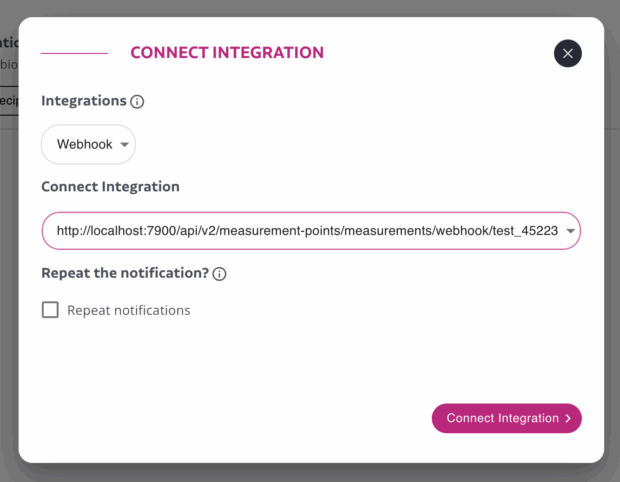
4. In the **Notifications** section, click **Connect integration**.
5. From the **Integration** dropdown, select **Webhook**, then choose the name of the webhook integration you created earlier.
6. Click **Connect Integration** and save your changes.
Once configured, any time the rule is triggered, Efento Cloud will automatically send a webhook notification to your specified URL.
{% endstep %}
{% endstepper %}
{% hint style="info" %}
You can **reuse a single webhook integration** across multiple rules. Simply assign the same connection to different rules — when any of them is triggered, the same webhook endpoint will receive the notification.
{% endhint %}
### Payload
Efento Cloud sends the alerts as JSON using the POST method. The alert webhook is triggered twice:
1. when the alarm rule is activated - the rule’s condition is met (e.g. temperature crossed the threshold),
2. when the alarm rule is deactivated - the rule’s condition is not active anymore (e.g. temperature got back to the safe range).
The JSON contains:
* Timestamp when the alert was created (condition of the rule was met)
* Timestamp when the alert was revoked
* Organization and location names
* Rule information (name, condition, parameter, threshold value)
* Measurement point information (name and serial number of the sensor assigned to it along with the channel)
* Value of the measurement that triggered the alert and value of the measurement that revoked the alert
JSON is structured as below:
```json
{
"createdAt": "2023-04-25 09:07:00",
"neutralizedAt": null,
"organizationName": "Test_org",
"locationName": "Test",
"ruleName": "test_above",
"ruleCondition": "MORE_THAN",
"ruleParameters": ["TEMPERATURE"],
"ruleType": "MEASUREMENT_MEASUREMENT_POINTS",
"deviceSerialNumber": "FFFFFFFFFF",
"webhookReminderCounter": 0,
"alertId": 1,
"resourceInfo":{
"id": 1,
"name": "Test integration for https://example.com",
"type": "MEASUREMENT_POINT"
},
"details": [
{"key": "channelNumber", "value": "1" },
{"key": "triggeringMeasurement", "value": "10" },
{"key": "revokingMeasurement", "value": "10" },
{"key": "thresholdValue", "value": "10" }
]
}
```
| createdAt | Timestamp (UTC) when the alert was triggered (e.g. measurement received by the platform was over the threshold; sensor was lost) |
| ---------------------- | ------------------------------------------------------------------------------------------------------------------------------------------------------------------------------------------------------------------------------------------------------------------------------------------------------------------------------------------------------------------------------------------------------------------------------------------------------------------------------------------------------------------------------------------------------ |
| neutralizedAt | Timestamp (UTC) when the alert was deactivated (e.g. measurement received by the platform got back below the threshold; sensor started sending the data to the platform again). If the webhook was triggered by meeting the rule’s condition, this field has ‘null’ value. |
| organizationName | Name of the Organisation in Efento Cloud in which the rule is configured |
| locationName | Name of the location in which the measurement point is located |
| ruleName | Name of the rule in Efento Cloud |
| ruleCondition | Rule condition. Available values: - more\_than - measured value is over the set threshold - less\_than - measured value is below the set threshold - occurred - binary sensor changed its state or low battery / lost rule condition is met |
| ruleParameters | Type of the measurement. Available values: TEMPERATURE, HUMIDITY, ATMOSPHERIC\_PRESSURE, DIFFERENTIAL\_PRESSURE, ALARM, WATER\_METER, ELECTRICITY\_METER, PULSE\_COUNTER, LOST, LOW\_BATTERY, IAQ, FLOODING, SOIL\_MOISTURE, CO\_GAS, NO2\_GAS, H2S\_GAS, AMBIENT\_LIGHT, PM\_1\_0, PM\_2\_5, PM\_10\_0, NOISE\_LEVEL, CH4\_GAS, NH3\_GAS, HIGH\_PRESSURE, DISTANCE\_MM, WATER\_METER\_ACCUMULATIVE, CO2\_GAS, STATIC\_IAQ, CO2\_EQUIVALENT, BREATH\_VOC, PERCENTAGE, VOLTAGE, CURRENT, PULSE\_COUNTER\_ACCUMULATIVE, ELECTRICITY\_METER\_ACCUMULATIVE |
| ruleType | Type of the rule. Available values: LOST\_MEASUREMENT\_POINTS, LOW\_BATTERY\_MEASUREMENT\_POINTS, MEASUREMENT\_MEASUREMENT\_POINTS, LOST\_GATEWAYS, POWER\_SUPPLY\_SOURCE\_CHANGE\_GATEWAYS, LOW\_BATTERY\_GATEWAYS |
| deviceSerialNumber | Serial number of the sensor assigned to the measurement point |
| webhookReminderCounter | This field shows the number of times a webhook has been repeated. If webhook repetition was enabled during rule configuration, this value increases with each repetition. |
| alertId | Unique ID of an alert |
| resourceInfo | Details about the measurement point / gateway that triggered the rule. id - unique identifier of the measurement point / gateway in Efento Cloud, name - name of the measurement point / gateway in Efento Cloud, type - type of the device - sensor (MEASUREMENT\_POINT) or gateway (GATEWAY). |
| details | This section details alarm information, including the channel number of the measurement point that triggered the alarm(channelNumber), the measurement value that triggered it (triggeringMeasurement), the threshold value (thresholdValue), and the measurement value that revoked the alarm (if the webhook was triggered by meeting the rule’s condition, this field has ‘null’ value (revokingMeasurement). |
Efento Cloud accepts responses with response code 2XX (e.g. 200, 201). All the other response codes are invalid.
{% hint style="warning" %}
**Important!** **If Efento Cloud receives an invalid response code five times in the row, the alert webhook will be disabled and has to be manually enabled by the user in Efento Cloud.**
{% endhint %}
### Limitations
There are few limitations that should be considered when using the alert webhooks:
* Multiple webhooks can be assigned to a single alert rule.
* A single webhook can be utilized across multiple alarm rules.
* The application, to which Efento Cloud sends the data, needs to respond within 10 seconds from the moment when the webhook was triggered
* Efento Cloud does not resend the alerts. If the application that receives the data was not responding the data will not be resent and needs to be pulled using Efento Cloud API
* The only accepted response codes, confirming that the measurements were received are 2XX codes (200, 201, etc.). **If Efento Cloud receives an invalid response code five times in the row, the alert webhook will be disabled and has to be manually enabled by the user in Efento Cloud.**
* The maximum URL length is 500 characters, including the mandatory “http\://” or “https\://” prefixes
* It is possible to configure up to five custom headers per webhook
* It is impossible to change the structure of the payload (JSON) sent
---
# Agent Instructions
This documentation is published with GitBook. GitBook is the documentation platform designed so that both humans and AI agents can read, navigate, and reason over technical content effectively. Learn more at gitbook.com.
## Querying This Documentation
If you need additional information that is not directly available in this page, you can query the documentation dynamically by asking a question.
Perform an HTTP GET request on the current page URL with the `ask` query parameter, and the optional `goal` query parameter:
```
GET https://docs.efento.io/efento-cloud/integrations/alert-webhooks.md?ask=&goal=
```
`ask` is the immediate question: it should be specific, self-contained, and written in natural language.
`goal` is optional and describes the broader end goal you are ultimately trying to accomplish on behalf of the user. GitBook uses it to tailor the answer towards what is most useful for that goal.
The response will contain a direct answer to the question and relevant excerpts and sources from the documentation.
Use this mechanism when the answer is not explicitly present in the current page, you need clarification or additional context, or you want to retrieve related documentation sections.
 checkmark will appear next to the button.
* If the test fails, verify that:
* The webhook URL is correct.
* All required headers are properly configured.
* Your application responds with the correct HTTP status code (`201`).
6. Once successful, click **Add Webhook** to save your configuration.
checkmark will appear next to the button.
* If the test fails, verify that:
* The webhook URL is correct.
* All required headers are properly configured.
* Your application responds with the correct HTTP status code (`201`).
6. Once successful, click **Add Webhook** to save your configuration.
 {% endstep %}
{% step %}
#### **Enable Webhooks for Selected Rule(s)**
1. Go to **Settings** (gear icon) → **Rules and notifications**.
2. Select or create a rule, configure its parameters, and click **Next**.
3. Choose the **sensors** or **locations** the rule will apply to, then click **Next**.
4. In the **Notifications** section, click **Connect integration**.
5. From the **Integration** dropdown, select **Webhook**, then choose the name of the webhook integration you created earlier.
6. Click **Connect Integration** and save your changes.
Once configured, any time the rule is triggered, Efento Cloud will automatically send a webhook notification to your specified URL.
{% endstep %}
{% step %}
#### **Enable Webhooks for Selected Rule(s)**
1. Go to **Settings** (gear icon) → **Rules and notifications**.
2. Select or create a rule, configure its parameters, and click **Next**.
3. Choose the **sensors** or **locations** the rule will apply to, then click **Next**.
4. In the **Notifications** section, click **Connect integration**.
5. From the **Integration** dropdown, select **Webhook**, then choose the name of the webhook integration you created earlier.
6. Click **Connect Integration** and save your changes.
Once configured, any time the rule is triggered, Efento Cloud will automatically send a webhook notification to your specified URL.