> For the complete documentation index, see [llms.txt](https://docs.efento.io/llms.txt). Markdown versions of documentation pages are available by appending `.md` to page URLs; this page is available as [Markdown](https://docs.efento.io/efento-cloud/basics/profile.md).
# Profile
This section describes how to manage your personal Efento Cloud account settings. From updating your contact information and password to configuring automatic logout, creating new organizations, or leaving existing ones, all account-related options are available in your profile settings. These tools help you personalize your experience and maintain full control over your access and organizational membership.
These settings are only accessible to the user who owns the profile; no other users can view or edit this information.
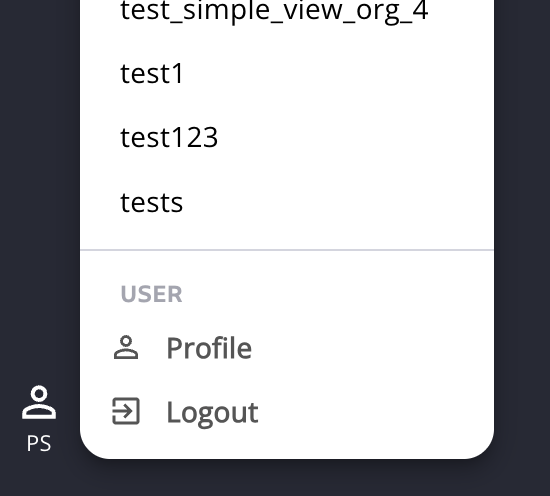
You can access your personal profile settings by clicking your **initials** in the lower-left corner of the screen. From this menu, you can either **log out** or open your **profile settings**.
## **User information**
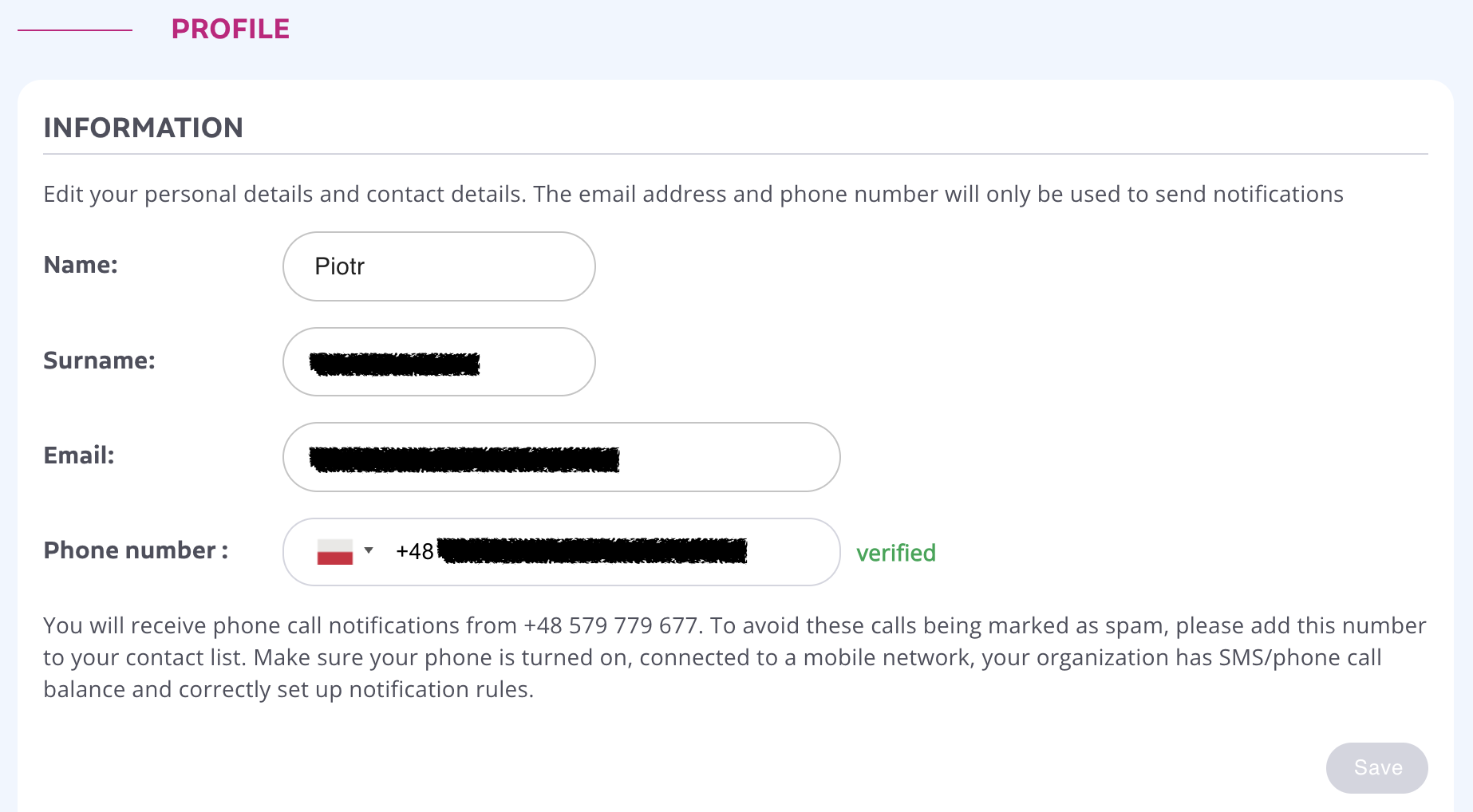
In the **Information** section, you can update your personal information, including:
* First and last name
* Email address
* Password for your Efento Cloud account
* Phone number used for notifications. To use SMS or phone call notifications, you must first add and verify your phone number. Enter your number in the profile settings and save the changes. Efento Cloud will send a verification code to the provided number. Enter the code and save the settings again. Once verified, the phone number will be marked as **“Verified”**, and you will be able to receive notifications from the platform.
After making any changes, click **Save** to apply them.
## **Settings**
In the **Settings** section you can:
* Select the time zone
* Select the interface, notifications and reports language
* Enable automatic logout - configure how long the system should wait before automatically logging you out due to inactivity. To set the timeout period, choose a value from the **Automatic logout after** dropdown list. To completely disable automatic logout, set the option to **Disabled**.
## Changing password
To change your password, enter a new password and save the settings. The password must be between 8 and 64 characters. Efento Cloud will check the strength of the password, and we recommend using only passwords rated as **Good** or **Strong** for better security.
## **Creating a new Organization and leaving an Organization**
In the **My Organizations** section, you can manage your membership in organizations.
To create a new organization, click **New Organization** above the organization list. Enter the name of the new organization and confirm by clicking **Next**.
To leave an organization, go to the **My Organizations** section and click **Leave** next to the selected organization. After leaving, you will immediately lose access to all of its data and measurements.
{% hint style="danger" %}
If you are the **last remaining member** of an organization, leaving it will cause the entire organization—including all stored measurements—to be permanently deleted from Efento Cloud.
{% endhint %}
You can view and switch between all organizations you belong to by clicking the icon with your initials in the lower-left corner of the screen.
## Deleting account
If you wish to permanently remove your Efento Cloud account, click **Delete Account**. This action deletes your user account along with all personal data stored in the system (name, email, phone number, etc.).
{% hint style="danger" %}
**Warning:** Deleting your account is permanent and cannot be undone!
{% endhint %}
---
# Agent Instructions
This documentation is published with GitBook. GitBook is the documentation platform designed so that both humans and AI agents can read, navigate, and reason over technical content effectively. Learn more at gitbook.com.
## Querying This Documentation
If you need additional information that is not directly available in this page, you can query the documentation dynamically by asking a question.
Perform an HTTP GET request on the current page URL with the `ask` query parameter, and the optional `goal` query parameter:
```
GET https://docs.efento.io/efento-cloud/basics/profile.md?ask=&goal=
```
`ask` is the immediate question: it should be specific, self-contained, and written in natural language.
`goal` is optional and describes the broader end goal you are ultimately trying to accomplish on behalf of the user. GitBook uses it to tailor the answer towards what is most useful for that goal.
The response will contain a direct answer to the question and relevant excerpts and sources from the documentation.
Use this mechanism when the answer is not explicitly present in the current page, you need clarification or additional context, or you want to retrieve related documentation sections.