> For the complete documentation index, see [llms.txt](https://docs.efento.io/llms.txt). Markdown versions of documentation pages are available by appending `.md` to page URLs; this page is available as [Markdown](https://docs.efento.io/efento-ble-loggers/using-loggers/special-settings-by-sensor-type/motion-sensor.md).
# Motion Sensor
## **How it works**
Motion and presence sensors detect movement or the presence of people in a room. They are binary devices with two possible states:
* **0 (OK):** No presence detected
* **1 (ALARM):** Presence detected
1. The user sets the measurement interval.
2. The sensor counts movements within each measurement period.
3. If the number of movements exceeds the **Movement Detection Sensitivity**, the period is flagged as "1" (movement detected).
4. If the number of movements is below the threshold, the period is flagged as "0" (no movement detected).
5. The sensor evaluates consecutive periods:
* If the number of consecutive "1" periods exceeds the **Movement Detection Periods** threshold, the sensor state changes to "1" (presence detected).
* If the number of consecutive "0" periods exceeds the **No Movement Detection Periods** threshold, the sensor state changes to "0" (no presence detected).
6. If thresholds are not met, the sensor state remains unchanged.
This logic ensures accurate detection while filtering out short-term fluctuations or noise.
## Configurable parameters
| Sensitivity threshold: Movement | The number of movements within a measurement period required to mark the period with a "1" (presence detected). For example, if the threshold is 3, any period with more than 3 movements is flagged as "1." | Range: 1 to 65,535 (must be higher than Sensitivity Threshold: No Movement). |
| --------------------------------------------- | ---------------------------------------------------------------------------------------------------------------------------------------------------------------------------------------------------------------- | -------------------------------------------------------------------------------------------------- |
| Sensitivity threshold: No Movement | The number of movements within a measurement period required to mark the period with a "0" (no presence detected). For example, if the threshold is 2, any period with fewer than 2 movements is flagged as "0." | Range: 0 to 65,535 (must be lower than Sensitivity Threshold: Movement). |
| Consecutive measurement periods: Movement | The number of consecutive measurement periods flagged as "1" needed to change the sensor’s overall state to "presence detected." | Range: 1 to 65,535. |
| Consecutive measurement periods: No Movement | The number of consecutive measurement periods flagged as "0" needed to change the sensor’s overall state to "no presence detected." | Range: 1 to 65,535. |
| Logic types | Controls the logic for the pulse input and the logic for the final returned value (movement/no movement). | Normal logic, Reversed logic |
| Pulse timeout | The maximum allowed length (duration) of a single pulse, in milliseconds. (Currently Unused) | 0: Max pulse length is not checked. 1 to 65,535 milliseconds (must be greater than Debounce Time). |
| Debounce time | Ignore state changes shorter than this time (in milliseconds). | 0: Debounce time not used. 1 to 65,535 milliseconds (must be lower than Pulse Timeout). |
## Configuration examples
#### **Motion detector**
If the device is used as a standard motion detector (changing state whenever movement is detected), set the parameters as follows:
* **Movement Detection Sensitivity:** 1
* **No Movement Detection Sensitivity:** 0
* **Movement Detection Periods:** 1
* **No Movement Detection Periods:** 1
#### **Presence detector**
Other settings are intended for use when the device functions as a presence detector. They help filter out short movements that could cause false positives (e.g., a door opening briefly triggering "presence detected") or false negatives (e.g., a person sitting still causing "no presence detected"). These parameters can be adjusted based on the characteristics and usage patterns of the room where the sensor is installed.
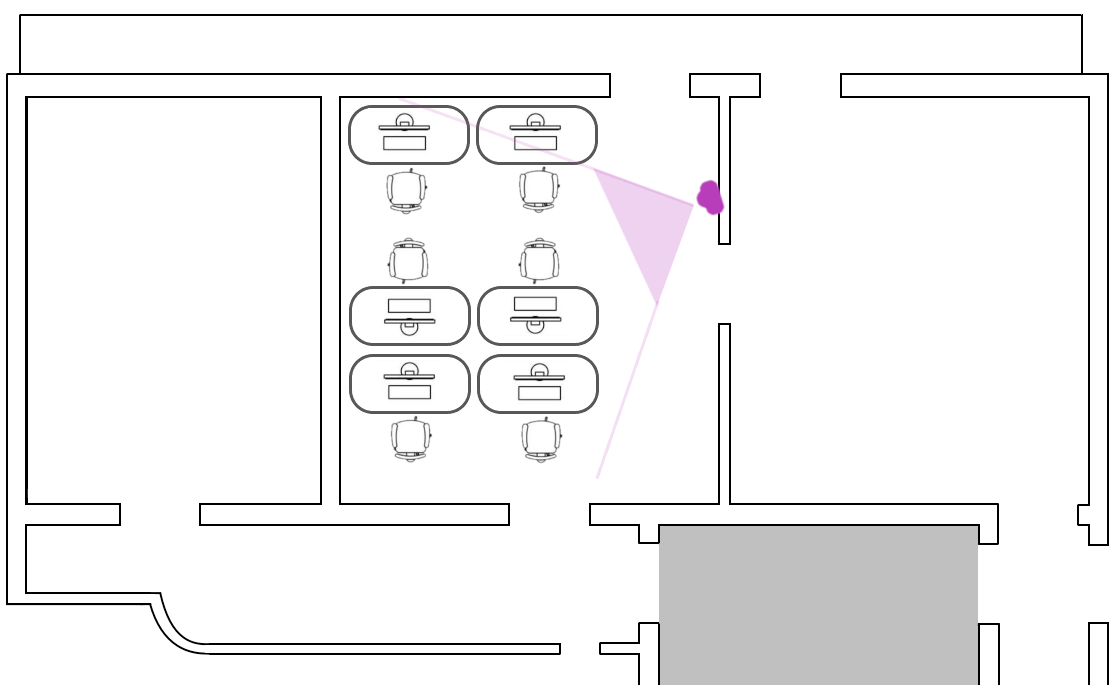
An example of using a presence detector in an office room with six workstations is shown in the picture below. The device was installed on the wall and covers all the desks in the room.
Efento motion sensor configuration:
* Movement detection sensitivity = 10
* No movement detection sensitivity = 0
* Movement detection periods = 1
* No movement detection periods = 2
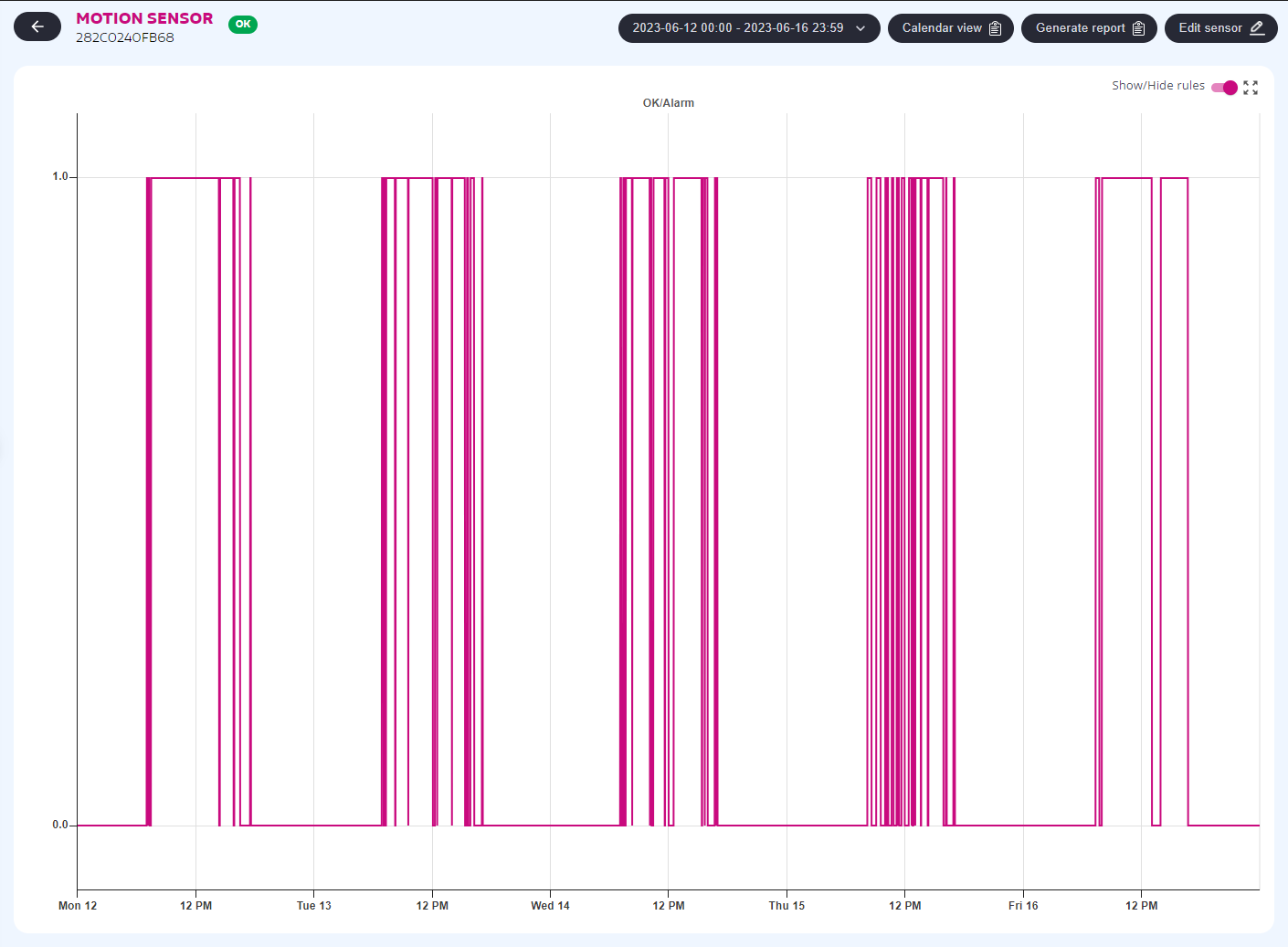
The five-day measurement results for this configuration are shown in the chart below. The device detected movement only between 7:00 and 18:00 - office working hours. At other times, no movement was detected.
---
# Agent Instructions
This documentation is published with GitBook. GitBook is the documentation platform designed so that both humans and AI agents can read, navigate, and reason over technical content effectively. Learn more at gitbook.com.
## Querying This Documentation
If you need additional information that is not directly available in this page, you can query the documentation dynamically by asking a question.
Perform an HTTP GET request on the current page URL with the `ask` query parameter, and the optional `goal` query parameter:
```
GET https://docs.efento.io/efento-ble-loggers/using-loggers/special-settings-by-sensor-type/motion-sensor.md?ask=&goal=
```
`ask` is the immediate question: it should be specific, self-contained, and written in natural language.
`goal` is optional and describes the broader end goal you are ultimately trying to accomplish on behalf of the user. GitBook uses it to tailor the answer towards what is most useful for that goal.
The response will contain a direct answer to the question and relevant excerpts and sources from the documentation.
Use this mechanism when the answer is not explicitly present in the current page, you need clarification or additional context, or you want to retrieve related documentation sections.