bluetooth-bBluetooth advertisement decoding

All Efento loggers include a built-in Bluetooth Low Energy (BLE) interface. This enables smartphones, BLE gateways, and custom hardware to communicate with the loggers, retrieve their measurements, and modify their configuration when needed. In this article, we demonstrate how to decode and interpret the data that Efento loggers broadcast in their BLE advertising frames.

Bluetooth Low Energy Advertising Transmissions

Bluetooth Low Energy (BLE) defines two types of radio transmissions: data transmissions and advertising transmissions. Advertising is used by BLE-enabled devices to broadcast information to nearby receivers. These packets may be used to initiate a connection between devices (for example, a smartwatch announcing itself to a phone) or simply to transmit small pieces of information without ever establishing a connection (such as a logger broadcasting temperature values to any listener).

Because advertising transmissions are connectionless, any BLE-capable device in range can receive them. The sender does not expect acknowledgments, and packets are broadcast without a guaranteed delivery mechanism. The structure of BLE advertising packets is defined by the official Bluetooth specificationarrow-up-right.

Efento loggers – BLE Advertising Behavior

Efento loggers use BLE advertising packets to transmit their most recent measurement along with key technical information. Each packet includes the latest measurement and its type, battery level, firmware version, optional calibration date, and the configured measurement interval. Advertising packets may also be encrypted, ensuring that only devices holding the correct encryption key can decrypt and interpret their contents.

Receiving the data

Efento loggers broadcast advertising packets continuously whenever Bluetooth is enabled. These transmissions cannot be selectively disabled (Bluetooth itself can be turned off, but if it is on, advertising will occur). Any BLE-capable device—such as a phone, tablet, or computer—can receive these packets.

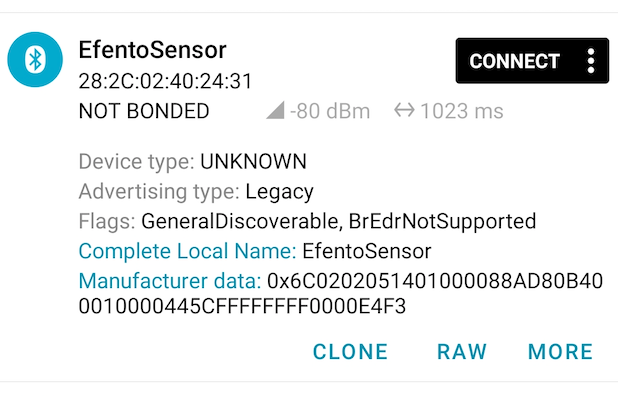
A simple way to view the advertising data is by using Nordic Semiconductor’s nRF Connect mobile application for Androidarrow-up-right or iOSarrow-up-right, which displays advertising information from all nearby BLE devices, including the “Manufacturer data” field used by Efento loggers.

circle-exclamation

Parsing the data

Efento loggers communicate their current status using BLE advertising frames. To retrieve complete information, the receiving device (e.g., a gateway) must perform active scanningarrow-up-right, enabling the logger to send both its standard advertisement and its scan response.

Efento devices running firmware version 6.X.X send their data in two separate frames:

  • Advertisement frame – contains device information

  • Scan response frame – contains the measurement values

To reconstruct the full logger state, the gateway must collect and parse both frames.

Decoding advertisement frame

  • Byte 1-2: Manufacturer ID – unique identifier of Bluetooth Low Energy equipped devices manufacturer. In case of Efento it is always “6C-02”

  • Byte 3: Manufacturing data version – set to “03” for Bluetooth advertisement frames

  • Byte 4-9: Device’s serial number (BLE MAC address)

  • Byte 10-11: Firmware version

    • Bit 0-4: Long term support version

    • Bit 5-10: Minor version

    • Bit 11-15 Major version

  • Byte 12: Status byte:

    • Bit 0: Battery level; 1 – Battery OK, 0 – Battery discharged

    • Bit 1-2: External power supply status: 00 – Battery only device, 01 – External power supply connected, 10 – external power supply disconnected, 11 – Power supply error

    • Bit 3: Encryption status: 0 – disabled, 1 – enabled

    • Bit 4: Time synchronisation: 0 – time synchronised, 1 – time not synchronised

    • Bit 5: Runtime error and modem info logging: 0 – no runtime errors and modem logs disabled, 1 – runtime error or modem logs enabled

    • Bit 6-7: Cellular status: 00 – BLE only device, 01 – cellular device working correctly, 10 – no connection to the server, 11 – network issue or device is not registered in the networkByte 7-10: Measurement counter, incremented at each measurement (used also as CTR counter for AES128-CTR encryption), 32-bit value encoded in big endian (most significant byte first)

  • Byte 13-16: Measurement timestamp in POSIX format

  • Byte 17-18: Measurement period base

  • Byte 19-20: Measurement period factor

  • Byte 21-22: Calibration date – optional field set by Efento and stored in nonvolatile memory

  • Byte 23-24: Checksum; CRC16 calculated from 6-byte serial number (MAC address, starting from first byte) and bytes 1 – 22

Example:

6C 02 03 28 2C 02 4F 00 12 31 44 11 64 21 56 24 00 B4 00 01 00 00 9E 04

1, 2

6C 02

Manufacturing specific data (always “06 02”)

3

03

Manufacturing data format (always “03” for Efento fw 6.X.X advertisement frame)

4, 5, 6, 7, 8, 9

28 2C 02 4F 00 12

Serial number: MAC – 282C024F0012

10, 11

31 44

Firmware version

HEX 31 44 = BIN 00110 001010 00100 Bit 0-4 = BIN 00100 = DEC 4 (LTS version) Bit 5-10 = BIN 001010 = DEC 10 (Minor version) Bit 11-15 = BIN 00110 = DEC 6 (Major version)

FW: 6.10.4

12

11

HEX 11 = Binary 00 0 1 0 00 1

Battery level: Bit 0 = 1: Battery – OK

External power supply status: Bit 1-2 = 00: Battery-operated device only

Encryption status: Bit 3 = 0: Disabled

Time synchronisation: Bit 4 = 0: Time not synchronised

Runtime error and logging on to the modem is inactive: Bit 5 = 0: Runtime error table is empty and logging on to the modem is inactive

Cellular status: Bit 6-7 = 00: BLE only device

13, 14, 15, 16

64 21 56 24

Measurements timestamp:

HEX 64 21 56 24 = 1679906340 = 27 March 2023 08:39:00 UTC

17, 18

00 B4

Measurement period base: HEX 00B4 = DEC 180 seconds

19, 20

00 01

Measurement period factor: HEX 0001 = DEC 1

21, 22

00 00

No calibration date set

23, 24

9E 04

CRC16

Decoding scan response frame

  • Byte 1-2: Manufacturer ID – unique identifier of Bluetooth Low Energy equipped devices manufacturer. In case of Efento it is always “6C-02”

  • Byte 3: Manufacturing data version – set to “04” for scan response frames

  • Byte 4: Type of measurement on slot 1

  • Byte 5-7: Measurement value (slot 1)

  • Byte 8: Type of measurement on slot 2 (optional)

  • Byte 9-11: Measurement value (slot 2) (optional)

  • Byte 12: Type of measurement on slot 3 (optional)

  • Byte 13-15: Measurement value (slot 3) (optional)

  • Byte 16: Type of measurement on slot 4 (optional)

  • Byte 17-19: Measurement value (slot 4) (optional)

  • Byte 20: Type of measurement on slot 5 (optional)

  • Byte 21-23: Measurement value (slot 5) (optional)

  • Byte 24: Type of measurement on slot 6 (optional)

  • Byte 25-27: Measurement value (slot 6) (optional)

  • Byte 28-29: Checksum, CRC16 calculated from 6-bytes serial number (MAC address, starting from first byte) and bytes 1 to 22 from manufacturing format 3 and bytes from 1 to (3+ (channel_number * 4)) from manufacturing format 4.

Measurement types

  • Efento loggers with firmware version 6.X.X can be equipped with up to six slots and measure up to six values.

  • Measurements represent physicals values that are measured by the logger assigned to a device slot. Measurement types are divided into two groups: Continuous and Binary measurements.

  • Each measurement type defines its own:

    • Minimum and maximum values - measurements below the minimum or above the maximum are reported as "error"

    • Resolution

    • Unit

    • Metadata factor - additional information related to the measurement (e.g., sensor calibration status)

The details for each measurement type are provided in the table below:

Type (HEX)
Type
Min Value
Max Value
Resolution
Unit
Continuous/ binary
Metadata factor
Summary

0x01

TEMPERATURE

-273.2

4 000.0

0.1

°C

continuous

1

Temperature

0x02

HUMIDITY

0

100

1.0

%

continuous

1

Humidity

0x03

ATMOSPHERIC_PRESSURE

1.0

2 000.0

0.1

hPa

continuous

1

Atmospheric pressure

0x04

DIFFERENTIAL_PRESSURE

-10 000

10 000

1.0

Pa

continuous

1

Differential pressure

0x05

OK_ALARM

0

1

1

binary

1

Binary format for indicates state OK/Alarm

0x06

IAQ

0

500

1.0

continuous

3

Indoor air quality

0x07

FLOODING

0

1

1

binary

1

Binary format for flooding

0x08

PULSE_CNT

0

8 000 000

1.0

continuous

1

Pulse counter

0x09

ELECTRICITY_METER

0

8 000 000

1.0

Wh

continuous

1

Electricity meter (pulse counter)

0x0A

WATER_METER

0

8 000 000

1.0

l

continuous

1

Water meter (pulse counter)

0x0B

SOIL_MOISTURE

-1000

0

1.0

kPa

continuous

1

Soil moisture

0x0C

CO_GAS

0

1 000 000

1.0

ppm

continuous

1

Carbon monoxide

0x0D

NO2_GAS

0

1 000 000

1.0

ppm

continuous

1

Nitrogen dioxide

0x0E

H2S_GAS

0

80 000.00

0.01

ppm

continuous

1

Hydrogen sulfide

0x0F

AMBIENT_LIGHT

0

100 000.0

0.1

lx

continuous

1

Illuminance

0x10

PM_1_0

0

1 000

1.0

µg/m^3

continuous

1

Mass concentration of particles less than 1µm

0x11

PM_2_5

0

1 000

1.0

µg/m^3

continuous

1

Mass concentration of particles less than 2.5µm

0x12

PM_10_0

0

1 000

1.0

µg/m^3

continuous

1

Mass concentration of particles less than 10µm

0x13

NOISE_LEVEL

0

200.0

0.1

dB

continuous

1

Noise level

0x14

NH3_GAS

0

1 000 000

1.0

ppm

continuous

1

Ammonia

0x15

CH4_GAS

0

1 000 000

1.0

ppm

continuous

1

Methane

0x16

HIGH_PRESSURE

0

200 000

1.0

kPa

continuous

1

High pressure

0x17

DISTANCE_MM

0

100 000

1.0

mm

continuous

1

Distance

0x18

WATER_METER_ACC_MINOR

0

99

1.0

liter

continuous

6

Accumulative water meter (pulse counter)

0x19

WATER_METER_ACC_MAJOR

0

999 999

1.0

hectoliter

continuous

4

Accumulative water meter (pulse counter)

0x1A

CO2_GAS

0

1 000 000

1.0

ppm

continuous

3

Carbon dioxide

0x1B

HUMIDITY_ACCURATE

0.0

100.0

0.1

%

continuous

1

Humidity

0x1C

STATIC_IAQ

0

10 000

1.0

continuous

3

Static indoor air quality

0x1D

CO2_EQUIVALENT

0

1 000 000

1.0

ppm

continuous

3

Carbon dioxide equivalent estimate

0x1E

BREATH_VOC

0

100 000

1.0

ppm

continuous

3

Breath-VOC estimate

0x1F

CELLULAR_GATEWAY

0

4 194 303

continuous

1

Cellular gateway

0x20

PERCENTAGE

0.00

100.00

0.01

%

continuous

1

Percentage

0x21

VOLTAGE

0.0

100 000.0

0.1

mV

continuous

1

Voltage

0x22

CURRENT

0.0

10 000.00

0.01

mA

continuous

1

Current

0x23

PULSE_CNT_ACC_MINOR

0

999

1.0

Pulses

continuous

6

Accumulative pulse counter

0x24

PULSE_CNT_ACC_MAJOR

0

999 999

1.0

Kilo Pulses

continuous

4

Accumulative pulse counter

0x25

ELEC_METER_ACC_MINOR

0

999

1.0

Wh

continuous

6

Accumulative electricity meter (pulse counter)

0x26

ELEC_METER_ACC_MAJOR

0

999 999

1.0

kWh

continuous

4

Accumulative electricity meter (pulse counter)

Decoding continuous sensor type

Each continuous measurement consists of a value and optional metadata. Value and metadata are defined by the following formulas:

Values are encoded using ZigZag.

Example

Scan response frame: 6C 02 04 01 00 01 C0 02 00 00 4C 28 30

Byte(s)
Value
Decoded

1, 2

6C 02

Manufacturing specific data (always “06 02”)

3

04

Manufacturing data format (always “04” for Efento fw 6.X.X scan response frame)

4

01

Slot type: 1 – Temperature

5, 6, 7

00 01 C0

HEX 01 C0 = DEC 448 ZIGZAG 448 = 224 (224/1)*0.1 = 22,4 -> Slot 1 measurement value: 22,4°C

8

Slot type: 2 – Humidity

9, 10, 11

00 00 4C

HEX 4C = DEC 76 ZIGZAG 76 = 38 (38/1)*1 = 38 Slot 2 measurement value: 38%

12, 13

28 30

CRC16

Decoding binary sensor type

Each binary measurement can only have 2 states: inactive (0 ) or active (1 ).

The binary sensor data is encoded in a 24-bit format, consisting of:

  • Value field (18 bits)

  • Status field (6 bits)

This structure represents the channel state over the last measurement period bases.

Value field (bits 0-17)

Each bit represents the sensor state for one measurement period.

  • 0 = inactive

  • 1 = active

  • Bit 0 (LSB) - most recent completed measurement period

  • Bit 17 - oldest stored measurement

To calculate the timestamp of bit n:

Where:

Status field (bits 18-23)

Indicates how many valid measurements are present in the Value field.

circle-info

Always read the Status field first to determine how many bits in the Value field are valid.

Interpretation:

  • 18 → All 18 bits (0–17) are valid

  • < 18 → Only bits 0 to n-1 are valid - common after device power-up or restart

  • > 18 → Channel error - treat the reading as invalid due to channel error

Status field decoding examples

Status field = 18

Value received in the scan response: (HEX) 0x48001F -> (BIN) 010010 000000000000011111

Status field = (BIN) 010010 -> (DEC) 18

Value field (BIN): 000000000000011111

In this example, all 18 bits in the Value field represent valid measurements.

The channel state changed from 0 to 1 at:

After this transition, the state remained 1 for all subsequent measurement periods (up to the most recent one).

Status field <18:

Value received in the scan response: (HEX) 0x080002 -> (BIN) 000010 000000000000000010

Status field = (BIN) 000010 -> (DEC) 2

Value field (BIN): 000000000000000010

In this example, only the two least significant bits (LSBs) represent valid measurements.

The channel state changed from 1 to 0 during the most recent measurement period.

This situation typically occurs after the device has been powered on or reset, when fewer than the full set of measurements have been recorded.

Status field >18:

Value received in the scan response: (HEX) FFFFFE -> (BIN) 111111 111111111111111110

Status field = (BIN) 011111 -> (DEC) 63

This indicates an error condition (no measurement), and the values from the Value field should be ignored.

Mapping of Values by Measurement Type

The interpretation of 0 and 1 depends on the selected Measurement type:

Type
State '0'Text
State '1'

OK_ALARM

OK

Alarm

FLOODING

Water not detected

Water detected

OUTPUT_CONTROL

OFF

ON

Example

Scan response frame 6C 02 04 05 4B FF FF C8 F9

Byte(s)
Value
Decoded

1, 2

6C 02

Manufacturing specific data (always “06 02”)

3

04

Manufacturing data format (always “04” for Efento fw 6.X.X scan response frame)

4

05

Slot type: 5 – Ok / Alarm

5, 6, 7

4B FF FF

(BIN) 010010 111111111111111111 Status field = 18 Value = 1 s

12, 13

C8 F9

CRC16

Last updated