> For the complete documentation index, see [llms.txt](https://docs.efento.io/llms.txt). Markdown versions of documentation pages are available by appending `.md` to page URLs; this page is available as [Markdown](https://docs.efento.io/efento-gateways/lte-gateway/connecting-power-and-inserting-sim-card.md).
# Connecting power and inserting SIM card
Before powering on the Efento LTE Gateway, please ensure that all [safety and installation guidelines](/efento-gateways/important-information/safety-guidelines.md) have been followed. Proper preparation helps prevent hardware damage and ensures stable operation from the moment the device starts up.
{% stepper %}
{% step %}
### **Connect the antennas**
Always connect the antennas **before** powering on the gateway. Operating the device without the antennas attached may cause damage to the internal radio modules or reduce communication performance.
{% endstep %}
{% step %}
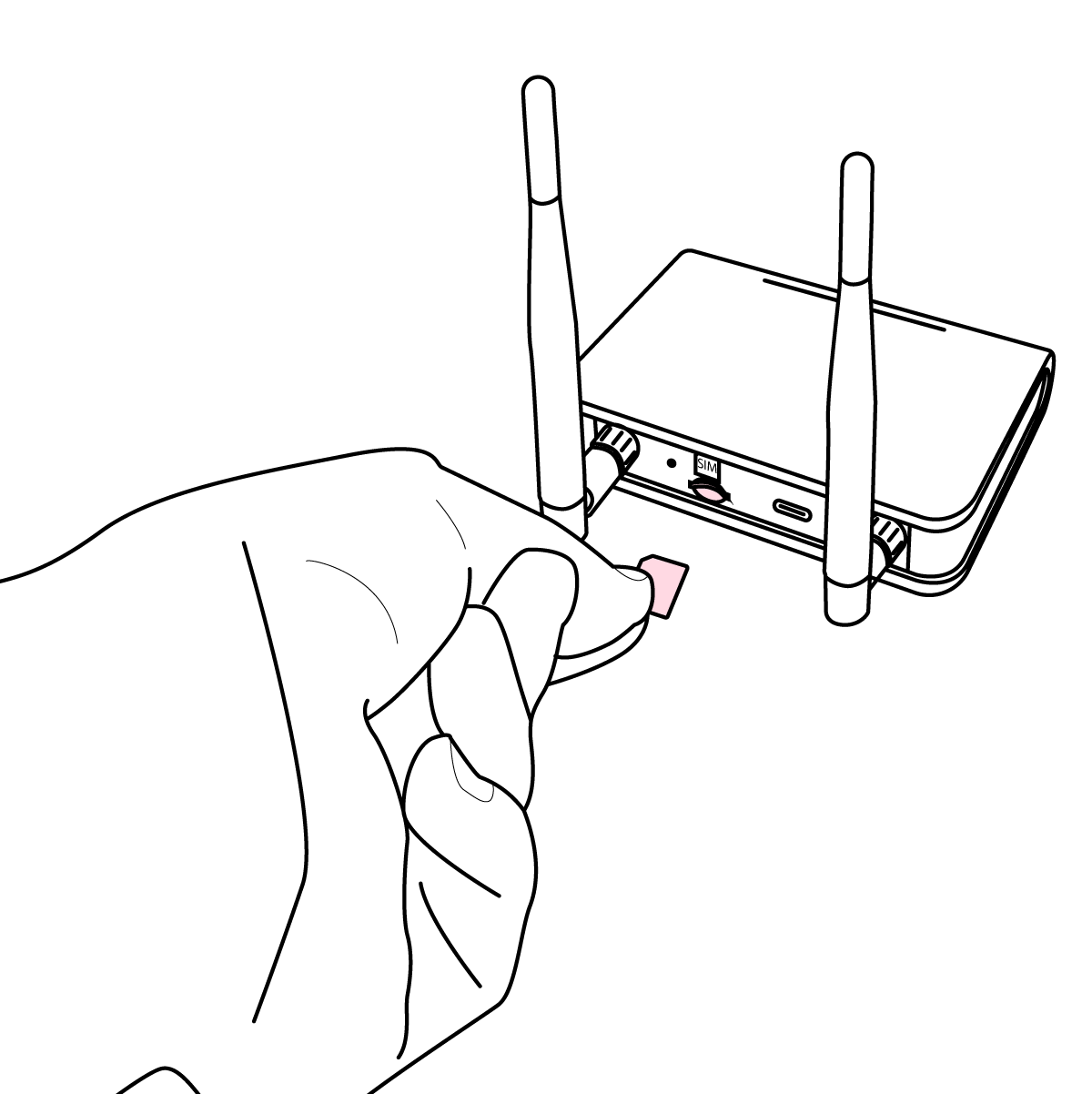
### Insert the SIM card
Insert a 4FF (nano-SIM) card into the LTE Gateway by sliding the card into the SIM slot with the metal contacts facing down and the cut corner oriented according to the slot’s outline. Gently push the SIM card in until it clicks into place, ensuring it sits flush with the device.
{% endstep %}
{% step %}
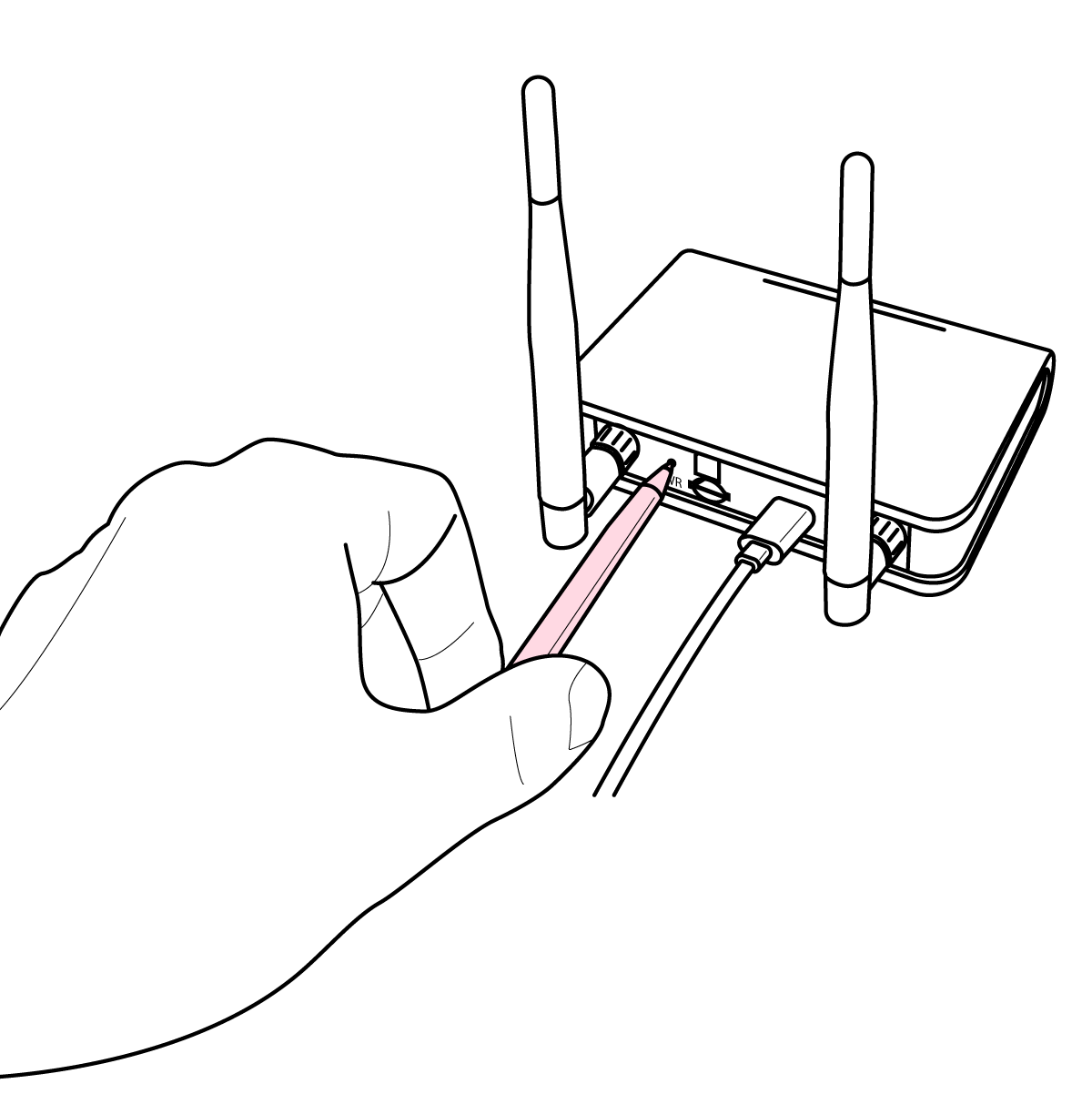
### **Connect the power supply**
A USB power supply is included with the gateway. Connect the power adapter to the **USB-C port** on the back panel of the device.
{% endstep %}
{% step %}
### Powering on the gateway
To turn on the Efento LTE Gateway, press the PWR button located on the back panel of the device.
{% endstep %}
{% step %}
### **Confirm startup and configuration mode**
When powering on a gateway that has not been configured before, it automatically enters **configuration mode**. In this mode, the device can be configured using the **Efento mobile app**.
* Configuration mode is indicated by a **blinking orange LED**.
* This mode remains active for **2 minutes**.
To re-enter configuration mode at any time, press the button located on the **back panel** of the gateway **twice**.
{% endstep %}
{% step %}
### You can now configure your gateway
Configure the Efento LTE Gateway to send the data to:
* [Efento Cloud](/efento-gateways/lte-gateway/configuration-with-efento-cloud.md)
* [a custom server](/efento-gateways/lte-gateway/configuration-with-a-custom-server.md)
{% endstep %}
{% endstepper %}
---
# Agent Instructions
This documentation is published with GitBook. GitBook is the documentation platform designed so that both humans and AI agents can read, navigate, and reason over technical content effectively. Learn more at gitbook.com.
## Querying This Documentation
If you need additional information that is not directly available in this page, you can query the documentation dynamically by asking a question.
Perform an HTTP GET request on the current page URL with the `ask` query parameter, and the optional `goal` query parameter:
```
GET https://docs.efento.io/efento-gateways/lte-gateway/connecting-power-and-inserting-sim-card.md?ask=&goal=
```
`ask` is the immediate question: it should be specific, self-contained, and written in natural language.
`goal` is optional and describes the broader end goal you are ultimately trying to accomplish on behalf of the user. GitBook uses it to tailor the answer towards what is most useful for that goal.
The response will contain a direct answer to the question and relevant excerpts and sources from the documentation.
Use this mechanism when the answer is not explicitly present in the current page, you need clarification or additional context, or you want to retrieve related documentation sections.